
When a customer is one tap away from a call, a visit, or a booking on your Google Business Profile (GBP), a well-timed Google Post can be the message that closes the gap. Posts are not Instagram. They reach people who are already searching for what you sell, in intent mode, on Search and Maps.
Restaurants, cafes, bars, and other food and drink spots get the biggest direct boost today: their posts can be elevated into a "Tonight" or "This Week" slot that Google says lifts profile engagement by roughly 9% in eligible markets (United States, Canada, Australia, and New Zealand). The same playbook still works for salons, trades, retail, and service businesses, just without the elevated slot.
This guide distills the official Google Business Profile workshop on Google Posts, led by Lisa Landsman (Search Partnerships, Small Business) and Mike Nagy (Product Manager, Google Posts), into a practical local SEO playbook for SMBs. It pairs with our broader guide to Google Business Profile and Local SEO essentials.
TL;DR
- Pick the right type. Updates for news, Offers for promotions with codes and dates, Events for time-bound happenings.
- Front-load value in the first 80 to 100 characters. Mobile previews truncate; lead with the hook.
- Post about once a week, Monday to Friday, during business hours.
- Use real photos and short video. No stock, no watermarks, video under 30 seconds.
- Skip the social-media tricks. No phone numbers, messaging links, ALL CAPS, exclamation spam, or hashtags inside the post body.
Why Google Posts matter for local SEO
Most "social" content reaches people in discovery mode: they did not ask for it. Google Posts reach people in intent mode: they typed your name, your category, or "near me" and found your profile. That changes how you should write them. The job is not to entertain a feed; the job is to give a buyer one more reason to click, call, or come in.
For one category, Google has been explicit about engagement: posts from food and drink businesses can be elevated into a "Tonight" or "This Week" slot above competing listings, which the workshop reported is associated with roughly 9% more profile engagement in eligible markets (United States, Canada, Australia, and New Zealand at the time of the workshop, with leisure and additional countries planned).
Official source: The 9% engagement figure for the food and drink elevated slot is as stated in the official Google Business Profile workshop on Google Posts on the @GoogleBusinessProfile YouTube channel, presented by Lisa Landsman and Mike Nagy.
For every other category, treat posts as a steady drumbeat that reinforces "this business is active, accurate, and worth choosing right now."
The three post types: Updates, Offers, Events
Every Google Post starts with copy and a photo or short video. The type you pick unlocks extra fields that Google can render in your favor.
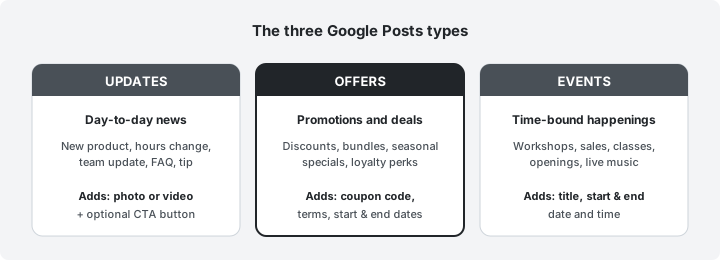
Official source: Post type definitions and the additional fields each type supports are as described in the official Google Business Profile workshop on Google Posts on the @GoogleBusinessProfile channel.
Updates are your default. New product, hours change, team member, FAQ, useful tip. Always pair with a real photo and an optional CTA button.
Offers are the most underused type for SMBs. They support a coupon code, terms and conditions, and a start and end date. The structured fields signal "promo" to Google, which is exactly what someone in intent mode is hunting for.
Events are the right type whenever there is a clock attached. Workshops, sales weekends, openings, classes, live music. Add the title, start, and end date and time, even when the optional fields say optional.
Where Google Posts show up
Posts do not live in only one place. The same post can show on multiple Search and Maps surfaces.
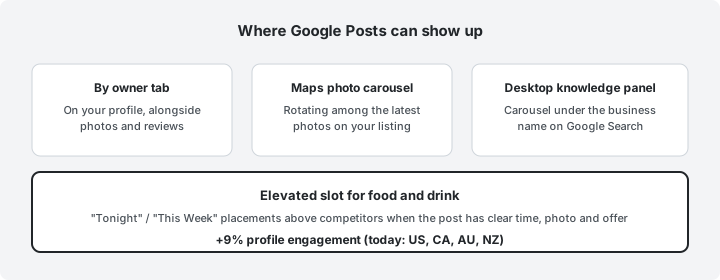
Official source: The four surfaces and the elevated food and drink slot are as described in the official Google Business Profile workshop on Google Posts on the @GoogleBusinessProfile channel.
The takeaway: a single post can hit a customer reading the knowledge panel on a desktop, scrolling Maps photos on a phone, and (for food and drink) an elevated slot above local competitors. That is why composition matters more than volume.
Best practice: front-load the first 80 to 100 characters
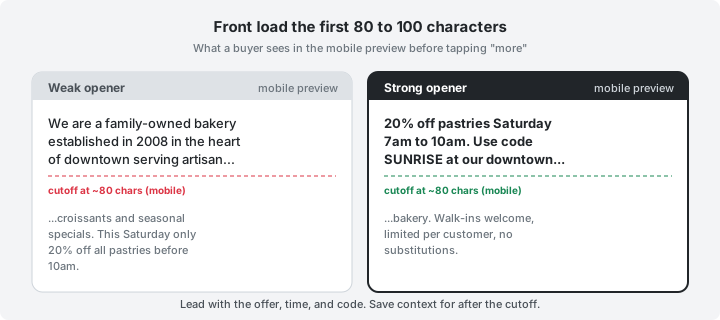
On mobile, previews of your post copy cut off after roughly 80 to 100 characters before "more" is tappable. If your hook lives in sentence three, most people never see it.
Official source: The 80 to 100 character mobile truncation guidance is as stated in the official Google Business Profile workshop on Google Posts on the @GoogleBusinessProfile channel.
Rewrite drill: swap the brand origin story for the offer. Save context for after the cutoff.
- Weak: "We are a family-owned bakery established in 2008 in the heart of downtown serving artisan croissants..."
- Strong: "20% off pastries Saturday 7am to 10am. Use code SUNRISE at our downtown bakery..."
Other best-practice rules from the workshop:
- Cadence: about one post per week, published Monday to Friday during business hours when reviewers and readers are most active.
- Photos: real, original, well-lit. Replace stock with a phone photo from this morning if you have to choose.
- Video: keep under 30 seconds, sharp visuals in the first three seconds.
- Tone: clear, calm, useful. Sell the next step, not the brand backstory.
Choose the right post type and call to action
The CTA button is part of the message. Match it to the buying step you want next.
| Business type | Good default post type | Best CTA button |
|---|---|---|
| Restaurant or cafe | Offer or Event | Order online or Book |
| Salon, spa, clinic | Offer or Event | Book |
| Trades and home services | Update or Offer | Call now |
| Retail and e-commerce | Offer | Buy or Shop |
| Education, classes, workshops | Event | Sign up or Learn more |
| Professional services | Update | Learn more or Contact us |
A few extras worth memorizing:
- Add start and end times even when optional. They unlock event-style rendering and let Google retire the post at the right moment.
- Use one URL per post and keep it stable, so you can read clean attribution in the GBP performance dashboard.
- Keep the destination relevant. A "20% off pastries" post should not land on the homepage; deep-link to the offer page.
Common mistakes that get posts rejected or ignored
The fastest way to look amateur on Google Search is to copy a tone that works on Instagram. Posts have a different audience and a different reviewer.
Do not:
- Put phone numbers, WhatsApp links, or messaging URLs inside the post body. Use the structured CTA button.
- Write in ALL CAPS or stack !!! exclamation marks.
- Use hashtags as ad copy. Posts are not a feed.
- Upload stock photos, watermarked images, or screenshots of text.
- Treat posts like a brand diary that has nothing to do with what someone can buy or book.
Do:
- Lead with the offer, time, or news in the first 80 characters.
- Pair every post with a fresh, real photo of the product, place, or work.
- Pick the structured fields (coupon code, dates, event time) the post type unlocks.
- Pick the CTA button that matches the next buying step.
- Repost a refreshed version on a steady weekly cadence rather than republishing the same copy.
When a post is rejected, the underlying reason is almost always one of the items in the "Do not" list above. Fix it and republish; you do not need to start over.
What is new in the redesigned Posts tool
Google has rebuilt the post management surface. A few features are worth using on day one.
- Scheduling. Set a future date and time for posts so a four-post month can be queued in one sitting.
- Copy to multiple listings. Write a post once and copy it across listings in your account, up to roughly 100 listings per copy action. Multi-location operators win the most time here.
- Preview for recurring offers and events. A new preview surfaces daily, weekly, or custom recurring patterns so a Tuesday happy hour or a monthly clinic does not need a manual repost.
The tool also surfaces a cleaner post management page so live, scheduled, expired, and rejected posts are easier to triage.
Multi-location guidance for owners and agencies
If you manage more than one listing, do not invent friction.
- Compose once, copy across. One destination URL, one CTA, one creative. Customize per location only when there is a genuinely local hook (a city-specific event, a store-only coupon, a regional offer).
- Stagger if needed. Use scheduling to spread posts across listings rather than firing identical copy across hundreds of profiles in the same minute.
- Keep ownership tidy. Multi-location posting only works when the same account has access to the right listings; revisit user roles before any large copy action.
A small, repeatable weekly playbook
A fifteen-minute weekly routine beats a "post when we remember" pattern.
- Pick one post type that fits this week (Update, Offer, or Event).
- Take one fresh photo on your phone, no stock.
- Write the first 80 characters as the hook: offer, time, code, or event.
- Add structured fields the type unlocks (dates, code, event time).
- Pick the CTA button that matches the next step.
- Schedule the post for a weekday during business hours.
Repeat. Steady cadence is what compounds.
For the broader picture of how posts fit alongside photos, reviews, Local Service Ads, and profile security, read our companion guide to Google Business Profile and Local SEO essentials for small businesses.
When you are ready to make sure your website is just as visible to AI-driven search as your profile is on Maps, run tryansly's AEO audit on your domain and pair those fixes with the weekly Google Posts habit above.


