
When someone searches for what you sell (coffee shop near me, emergency plumber, bookstore downtown), Google often answers with the Local Pack and Maps. Your Google Business Profile (GBP) is the asset that determines whether you show up there with the right name, hours, photos, and proof that you are real.
Google’s own small business channel describes that profile as your digital storefront: the part of local SEO you control directly on Search and Maps. The following strategies distill highlights from the official Small Business Bulletin video on the Google Business Profile YouTube channel (@GoogleBusinessProfile) and frame them in a practical local SEO checklist for SMBs.
TL;DR
- Invest in photos: they are correlated with more visits, direction requests, and site clicks.
- Lock down access: treat profile ownership like cash; enable 2-Step Verification and reject bogus transfer requests.
- Stay discoverable: use local posts, keep contact options accurate, and follow Google’s SMB channel for workshops on social links and messaging.
- If you sell local services, explore Local Service Ads for pay-per-lead placement and trust badges where you qualify.
- Lean into community proof: authentic reviews and photos from customers (including Local Guides) reinforce credibility.
Why Google Business Profile is the center of local SEO for SMBs
Local SEO is everything that helps you appear for geographically intent searches: city names, “near me,” neighborhood modifiers, and map-driven discovery. Technical site SEO still matters, but for many small businesses the first impression is the Business Profile: stars, photos, hours, and a one-tap call or directions button.
Your website argues your case; your Business Profile closes the distance between intent and action.
If you need a vertical-specific playbook (for example property management), see our deeper guide to Google Business Profile optimization for property managers. The principles below apply broadly; that post goes category-by-category for one industry.
Prioritize high-quality visuals
Google’s guidance positions visuals as silent salespeople: they answer “what does it feel like to visit?” before a customer reads a paragraph on your site.
According to the official Bulletin video, businesses with photos on Search and Maps are associated with stronger engagement:
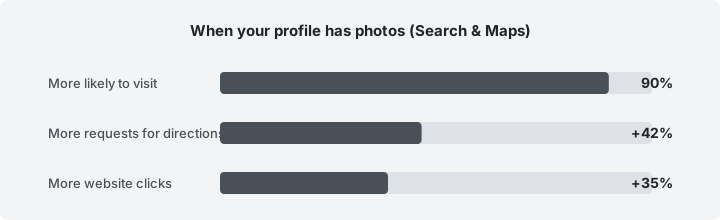
Treat the figures as directional engagement signals; your category, market, and profile completeness still matter.
Official source: The percentages in the chart are as stated in Google’s official Small Business Bulletin video from the Google Business Profile channel on YouTube (@GoogleBusinessProfile).
Practical photo checklist
- Exterior from the customer’s approach (signage readable).
- Interior that shows seating, aisles, or service areas. Set expectations.
- People and craft (team, owner, work in progress) where it is safe and authentic.
- Seasonal refreshes so the profile does not look abandoned.
Protect your profile from hijacking and scams
A compromised profile can misdirect phone lines, push malicious links, or damage years of review equity. Prevention is cheaper than recovery.
- Google will not ask for your password, broad ownership access, or verification PINs through cold calls or random texts. Hang up, go to official Google surfaces, and verify alerts inside signed-in tools.
- Turn on 2-Step Verification for the Google account that controls the Business Profile.
- Review pending owner and user requests on a schedule; deny anything unfamiliar immediately.
- Limit admin seats to people who truly need them; remove former employees.
Treat GBP admin access with the same discipline as a bank login, because for many businesses, it is the bank of inbound leads.
Optimize for discoverability: posts, messaging, and workshops
Interactive profile features shrink the gap between discovery and conversation.
Local posts
Short updates (events, offers, new hours, a popular FAQ) signal that you are active this week, not only when the listing was first verified. Aim for a sustainable cadence (for example weekly) rather than bursts followed by silence.
Messaging and social links
Google periodically hosts live workshops for owners on topics such as adding social media links and enabling direct messaging (for example WhatsApp or SMS paths where supported). Check the Google Business Profile YouTube channel for the next scheduled session rather than relying on a single fixed date.
Consistency
NAP consistency (name, address, phone) across your site and citations still supports local SEO; your profile should match what appears on your storefront and footer.
Use Local Service Ads if you are in an eligible service category
For trades and licensed professionals (for example plumbers, locksmiths, lawyers in eligible regions), Local Service Ads (LSAs) can complement organic local visibility. The Bulletin emphasizes two ideas SMBs care about:
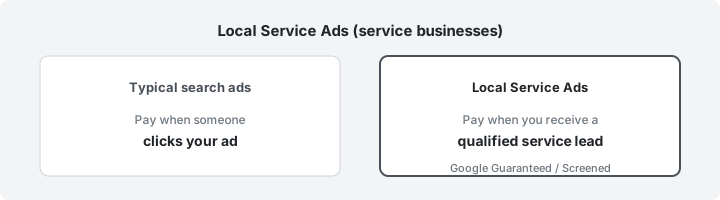
- Pay per lead (for qualifying actions tied to your services) rather than paying for every click that may never call.
- Trust badges such as Google Guaranteed or Google Screened where the program applies, useful when a homeowner or client is choosing among unfamiliar providers.
LSAs are not universal: categories, screening rules, and geography vary. Treat them as a channel to test with clear cost-per-lead targets, not a replacement for a complete profile and website.
Leverage the Local Guides ecosystem (without gaming it)
There are hundreds of millions of Local Guides worldwide, people who contribute reviews and photos to Maps. You cannot “buy” that community, but you can align with how it actually works:
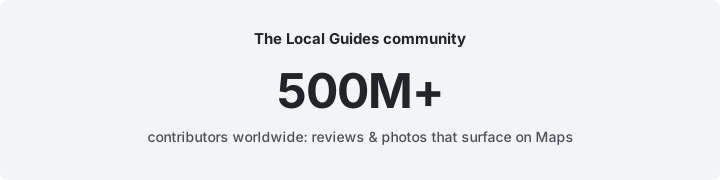
Official source: The Local Guides scale figure is as stated in the same official Small Business Bulletin video on the @GoogleBusinessProfile channel.
- Earn better reviews with service quality, clear expectations, and fast issue resolution.
- Make leaving a review easy: a direct link from email receipts, SMS follow-ups, or QR codes on receipts (where compliant with your policies).
- Respond to feedback: thank people for specifics, fix recurring problems publicly, and take detailed complaints offline when appropriate.
Authentic photos from customers often mirror what prospects want to see: real portions, real rooms, and real timelines, complementing the brand-directed photography you upload yourself.
Myth vs fact (quick sanity check)
| Myth | Fact |
|---|---|
| “Once verified, the profile runs itself.” | Profiles decay without photos, posts, review responses, and accurate hours, especially after holidays or staffing changes. |
| “More keyword stuffing in the business name helps rank.” | Violates guidelines and risks suspension; use your real legal or DBA name. |
| “LSAs replace the need for a good website.” | LSAs and GBP capture demand; your site still closes complex purchases and carries depth Google cannot host for you. |
This week on your Google Business Profile
- Add or refresh three photos with clear filenames before upload.
- Confirm 2-Step Verification and scan pending access requests.
- Publish one local post tied to a timely offer or customer question.
- If you run a local service business, read Google’s current LSA eligibility for your category and city.
- Reply to every new review from the last fourteen days.
To improve how your site is understood by AI-assisted search, in addition to visibility on Maps, run tryansly’s AEO audit on your domain and pair those fixes with the GBP habits above.


